
Steps to Access Your Vaccination Certificate Digitally
Author:XTransfer2025.05.30Vaccination Certificate
Accessing your vaccination certificate digitally has never been easier. You can quickly find your covid-19 vaccination details online or through mobile apps. Digital records provide a secure way to keep track of your vaccination history. Whether you need digital proof of vaccination for travel or work, having this information readily available ensures you stay prepared.
Accessing Your Vaccination Certificate Through Government Portals
Logging into the official portal
To access your vaccination certificate, start by visiting the official government portal for health records. These portals are designed to provide secure access to your digital vaccination record. Look for websites ending in ".gov," as these are verified government domains. Ensure the site uses HTTPS, which guarantees a secure connection. You can identify this by the lock symbol in the browser's address bar.
When logging in, you may need to create an account if you don’t already have one. Use your email address or phone number to register. Some portals also allow you to log in using your Medicare online account or other linked health services. Always use a strong password to protect your information.
Finding the covid-19 vaccine records section
Once logged in, navigate to the section dedicated to covid-19 vaccination records. This section is often labeled as "Immunization History" or "Vaccination Records." If you’re unsure where to find it, check the portal’s help or FAQ section for guidance. Many government websites provide step-by-step instructions to help you locate your records.
The Centers for Disease Control and Prevention (CDC) offers resources to assist you in finding your vaccination details. These include guides for adults, children, and even special cases like missing records. Below are some helpful sources:
-
Vaccination Requirements: Information on vaccination requirements for immigrants, including references to CDC's technical instructions.
-
CDC Vaccination Records: Guidance on finding and interpreting vaccination records, including COVID-19.
-
Adult Vaccination Records: Details on how to locate vaccination records and what to do if they are missing.
-
Vaccination Records for Kids: Information on recording immunizations and finding official records.
Verifying your identity and vaccination details
Before downloading your vaccination certificate, you must verify your identity. This step ensures that only you can access your health records. Most portals require you to upload a government-issued ID, such as a driver’s license or passport. Some systems may also ask for additional verification, like answering security questions or providing your vaccination card details.
After verifying your identity, review your vaccination status to confirm its accuracy. Check the dates and doses of your covid-19 vaccinations. If you notice any discrepancies, contact your healthcare provider or the portal’s support team to resolve the issue.
By following these steps, you can securely access your digital vaccination certificate. This document serves as digital proof of vaccination, which is essential for travel, work, or personal use.
Using Mobile Apps to Access Digital Vaccination Certificates
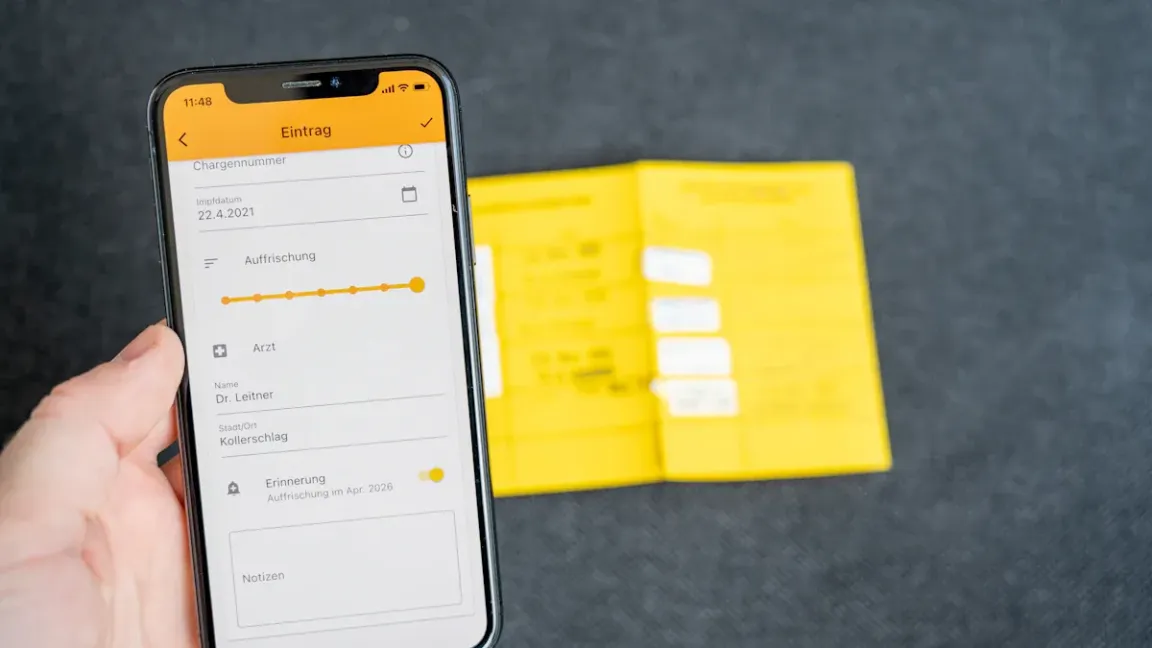
Downloading and installing the app (e.g., Docket®, MyIRMobile)
Mobile apps like Docket® and MyIRMobile make it easy to access your digital vaccination record. To get started, you need to download and install the app on your smartphone. Follow these steps:
-
Open the App Store (iPhone) or Google Play Store (Android) on your device.
-
Search for the app by name, such as "Docket®" or "MyIRMobile."
-
Check the app's details to ensure it is the official version. Look for high ratings and reviews to confirm its reliability.
-
Tap "Install" or "Get" to download the app. Wait for the installation to complete.
Some apps, like those mentioned in the Bottleneck Analysis App guide, provide detailed instructions for installation. These guides also include links to training materials, ensuring you understand how to use the app effectively. Additionally, apps designed for immunization campaigns often include features for real-time monitoring and evaluation of vaccination efforts.
Once installed, open the app and follow the on-screen prompts to set up your account. You may need to provide basic information, such as your name, date of birth, and contact details.
Linking your covid-19 vaccine records to the app
After setting up the app, the next step is to link your covid-19 vaccine records. This process ensures your vaccination status is securely stored and easily accessible. Many apps use advanced security measures to protect your data. For example, the Health app on iPhones stores verifiable health records that are digitally signed by a health authority. This digital signature acts like an official seal, guaranteeing the authenticity of your information.
To link your records, follow these general steps:
-
Log in to the app using your account credentials.
-
Navigate to the section for adding vaccination records.
-
Enter the required details, such as your vaccination dates and the location where you received the vaccine.
-
Verify your identity by uploading a government-issued ID or providing your vaccination card details.
Some apps, like My HealtheVet, offer additional options for veterans. After registering for a Premium account, veterans can access their covid-19 vaccination records by selecting "Health Records" and downloading detailed reports. These reports include information about each vaccine dose and can be saved directly to your smartphone.
Viewing and saving your vaccination certificate
Once your records are linked, you can view and save your digital vaccination certificate. This document serves as digital proof of vaccination, which is essential for travel, work, or personal use. Most apps display your certificate in an easy-to-read format, showing your name, vaccination dates, and vaccine type.
To save your certificate, look for options like "Download" or "Save." Many apps allow you to save the certificate as a PDF or image file, making it easy to share or print. If you use an iPhone, you can add the proof to your Apple Wallet for quick access. This feature is especially useful when you need to show your vaccination status at airports or other checkpoints.
User testimonials highlight the convenience of using mobile apps for vaccination records. For example, vaccinators have praised the accuracy of app data compared to manual records. Real-time data entry has also improved tracking of incomplete vaccinations, helping users stay up-to-date with their immunization history statements.
By following these steps, you can easily access, view, and save your digital vaccination certificate. This ensures you always have proof of vaccinations ready when needed.
Downloading, Saving, and Alternative Methods for Proof of Vaccinations
Saving your certificate as a PDF or image file
Saving your vaccination certificate as a digital file ensures you always have access to it. Most government portals and mobile apps provide an option to download your certificate. Look for a "Download" or "Save" button after accessing your vaccination record. Choose a format like PDF or image, as these are widely accepted for sharing and printing.
Once downloaded, store the file in a secure location on your device. You can use cloud storage services like Google Drive or iCloud for backup. This keeps your digital vaccination record safe and accessible from multiple devices. If you use an iPhone, you can add the proof to your Apple Wallet for quick access during travel or other situations requiring proof of vaccinations.
Printing a physical copy for backup
A printed copy of your vaccination certificate serves as a reliable backup. After downloading the file, open it on your computer or smartphone. Use a printer to create a clear, legible copy. Ensure the details, such as your name, vaccination dates, and vaccine type, are visible.
Keep the printed copy in a safe place, like your travel documents folder. This ensures you have proof of vaccinations even if you lose access to your digital files. A physical copy is especially useful in areas with limited internet access or for individuals who prefer tangible records.
Alternative methods for special cases (e.g., no internet access or lost records)
If you cannot access your vaccination certificate digitally, explore alternative methods. Contact your healthcare provider or local health department to request a copy of your vaccination records. They can provide a printed or emailed version of your covid-19 vaccination details.
For individuals without internet access, visiting a nearby clinic or pharmacy may help. Many facilities can retrieve your vaccination status using your Medicare online account or other health records. If your records are lost, provide as much information as possible, such as the date and location of your vaccine. This helps healthcare providers locate your vaccination history.
By following these steps, you can ensure you always have proof of vaccinations, whether in digital or physical form.
Accessing your digital vaccination certificate is straightforward and reliable. You can use government portals or mobile apps to retrieve your health records. These tools ensure your vaccination status is secure and accessible. Nearly 100 million US residents already use SMART Health Cards for proof of vaccinations. The EU Digital Covid Certificate also supports seamless travel across 27 countries. Collaborative efforts, like the Vaccination Credential Initiative, highlight the global push for secure digital records. If you face challenges, contact your healthcare provider or use your medicare online account to retrieve your records.
FAQ
How can you access your vaccination records if you lose internet access?
Visit your local health department or clinic. They can retrieve your vaccination records using your personal details, ensuring you always have access to your information.
Can you use your My HealtheVet account to access vaccination records?
Yes, you can. Log in to your My HealtheVet account, navigate to the health records section, and download your vaccination details for easy access and safekeeping.
Is it safe to store your digital vaccination certificate on your phone?
Yes, it is safe. Use secure apps or cloud storage to protect your digital certificate. Always enable security features like passwords or biometric locks on your device.
Related content