
How to Create Professional Invoices Quickly and Easily
Author:XTransfer2025.04.24Invoices
Professional invoices are important for your business to do well. They help you get paid on time, keep trust, and save time. Businesses using good invoices often have better money flow.
-
Clear rules for payment help people pay faster.
-
Giving clear steps helps 70% of businesses get paid quicker.
-
Well-organized invoices make on-time payments more likely.
Making invoices fast and easy lowers stress. This gives you more time to grow your business.
What Is a Professional Invoice?
Definition and Purpose
A professional invoice is a paper you send to clients. It asks them to pay for goods or services you gave them. It keeps a record of the deal and shows details like cost, payment rules, and due dates. Think of it as a way to explain clearly what your clients owe and when they should pay.
Professional invoices are also very useful for running your business. They help you track your income, make taxes easier, and protect you in case of problems. For example, an invoice can prove what you and your client agreed on. This helps fix any disagreements quickly.
Here’s a simple look at what invoices are and why they matter:
Why Professional Invoices Are Important for Businesses
Using professional invoices is key to your business doing well. They do more than ask for money—they make you look trustworthy, improve cash flow, and build better client ties. Here’s why they’re important:
-
Transparency: A professional invoice explains the deal clearly. It lists what you sold, their prices, and extra fees. This builds trust and avoids arguments.
-
Accuracy: Adding details like hours worked or items sold makes invoices correct. This keeps clients happy and relationships strong.
-
Professionalism: A neat invoice shows you care about quality. It makes your business look good and serious.
Studies show that using automated invoices saves money. Businesses save about $34,000 yearly and $11 per invoice. Here’s a closer look at some numbers:
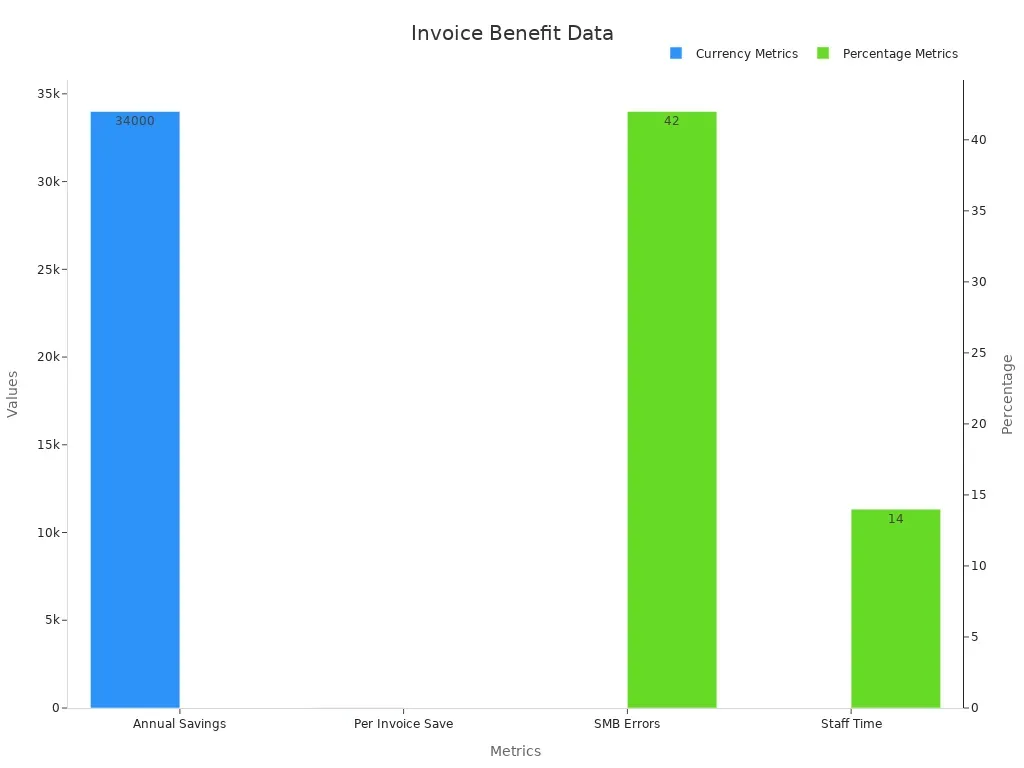
Professional invoices also stop costly delays. Studies say 44% of companies face late invoices, losing $909,506 monthly. Clear and correct invoices can fix this and improve cash flow.
Lastly, professional invoices make you look reliable. They show clients you care about being clear and detailed. This builds loyalty and repeat business. A good invoice is more than a bill—it shows your professionalism and care for great service.
Key Parts of an Invoice
Business Info (Logo, Name, and Contact)
Begin your invoice with your business name and logo. Add your contact details like phone, email, and address. This makes your invoice look neat and easy to recognize. A clear header helps clients know it’s from you.
Client Info (Name and Contact)
Write the client’s name and contact details on the invoice. This ensures it goes to the right person. Include their email and phone number for quick communication. Correct client info avoids mistakes and confusion.
Invoice Number, Date, and Due Date
Give each invoice a unique number to keep track. Add the date you made the invoice and when payment is due. These details help you stay organized and remind clients to pay on time.
List of Products or Services
List all the products or services you provided. Use simple descriptions so clients understand what they’re paying for. Show the cost of each item clearly. This builds trust and avoids any confusion.
Total Amount and Payment Rules
Show the total amount owed in a big, clear way. Write down how clients can pay and any late payment rules. Clear payment terms help clients pay faster and avoid delays.
Extra Notes (Thank You or Payment Reminders)
Add a short note at the bottom of the invoice. Say thank you or remind them about late payment rules. These small details make your invoice friendly and professional.
Step-by-Step Guide to Creating Invoices Quickly
Use an Invoice Template Example
Using an invoice template is a simple way to make invoices fast. Templates have a ready-made layout where you add your business and client info, services, and payment terms. This saves time since you don’t need to start fresh each time. Many templates let you change colors, add logos, or include notes to match your style.
Templates also help avoid mistakes. A consistent format ensures important details like invoice numbers and due dates are included. Studies show that improving templates can make invoices more accurate. This means fewer errors and quicker payments.
Small business owners benefit from templates because they save effort. You can find free or paid templates online or use ones in invoicing software. These tools often calculate totals automatically, making the process easier.
Automate Calculations for Accuracy
Doing math for totals, taxes, and discounts by hand can cause mistakes. Automated calculations make invoices correct and save time. Most invoicing tools have built-in calculators to do this for you. Just enter amounts and rates, and the system calculates everything.
Automation prevents problems like wrong data. Research shows 23% of companies deal with invoice errors. Using automation reduces these issues and helps you get paid faster.
If you handle many clients, automation can manage tricky calculations like discounts or special pricing. This speeds up the process and keeps clients happy with clear billing.
Leverage Invoicing Software
Invoicing software makes billing faster and easier. These tools help you create invoices, track payments, and send reminders for overdue bills. Popular options like QuickBooks and FreshBooks are simple to use and have helpful features.
One big benefit is automated invoicing. You can set up recurring invoices for regular clients, so you never miss sending one. Over half of businesses find manual data entry slow, so they switch to automated tools. With invoicing software, you can focus on growing your business instead of paperwork.
Automated invoicing also boosts efficiency. Companies like Nuuday saved money and completed more tasks by using these systems. You can also see the status of invoices in real time.
Note: Pick invoicing software with features like accounting tool integration, customizable templates, and secure payment options.
Save and Reuse Client Information
Saving client info makes invoicing faster. Instead of typing the same details every time, store names, addresses, and payment preferences in your invoicing tool. This saves time and reduces errors.
For repeat clients, stored info lets you create invoices quickly. Many tools organize client data into groups, making it easy to find and use.
Reusing client info keeps invoices consistent. You can ensure all invoices for a client look the same and have correct details. This builds trust and encourages timely payments.
Case Studies on Invoice Creation Speed
These examples show how using templates and automation can improve invoicing. Faster processing, fewer mistakes, and better tracking are just some of the benefits.
Best Practices for Efficient Invoicing
Set Clear Payment Terms
Clear payment rules help avoid confusion and late payments. Add details like due dates, payment methods, and late fees. For example, saying “Pay within 15 days” sets clear rules. This openness builds trust and avoids arguments. Businesses with clear terms often get paid faster.
Offer Multiple Payment Options
Giving more ways to pay makes it easier for clients. Include options like credit cards, bank transfers, or digital wallets. Clients like having choices, which speeds up payments. Studies show businesses with many payment options get money quicker. Making payments simple helps clients pay on time.
Use Digital Tools for Faster Delivery
Digital tools let you send invoices quickly and track them. Emailing invoices or using software is faster than mailing them. Many tools send reminders for late payments automatically. This saves time and effort. Digital tools also store templates, making repeat invoices easy to create.
Follow Up on Overdue Payments
Chasing late payments keeps your cash flow steady. Send kind reminders when payments are late. A polite email or call often solves the problem. Check due dates daily to find unpaid invoices. This keeps accounts updated and relationships strong. Regular follow-ups show you’re serious and help clients pay on time.
Recommended Tools and Templates for Creating Invoices

Popular Invoicing Software (e.g., QuickBooks, FreshBooks, Wave)
Picking the right invoicing software makes billing easier. Many tools offer features like automation, tracking payments, and editable templates. Below is a comparison of popular choices:
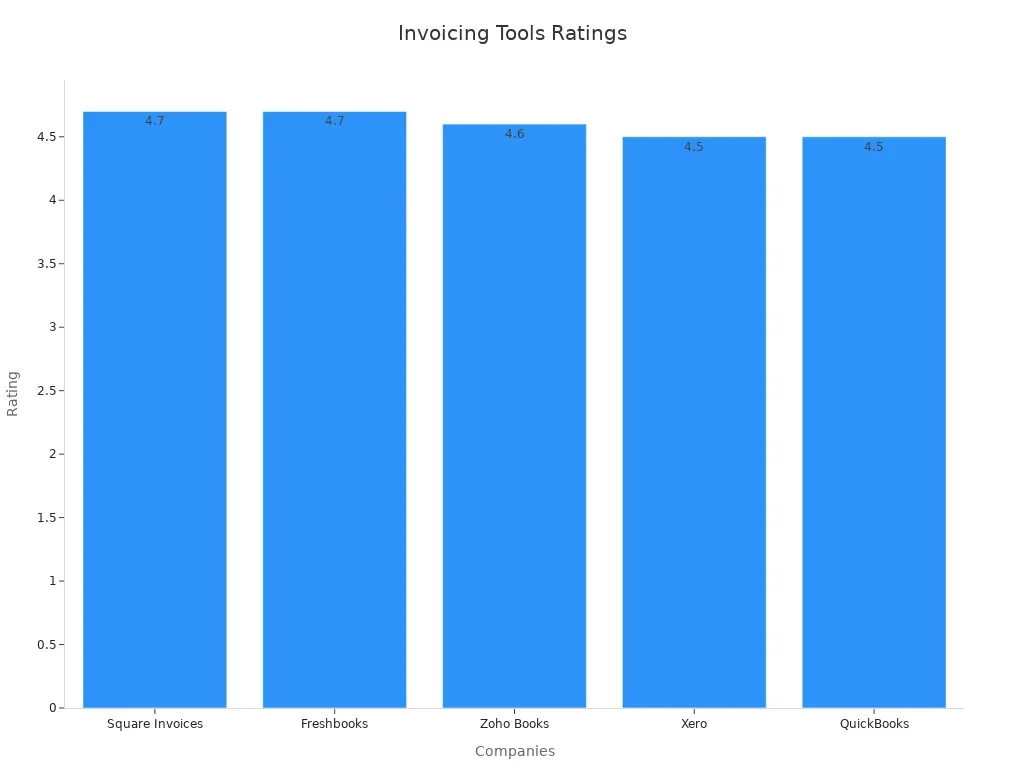
Each tool has its own strengths. For instance, FreshBooks works well for freelancers. QuickBooks is better for small businesses. Try these tools to find what fits your needs best.
Free and Paid Invoice Template Examples
Templates save time and keep invoices neat. Free templates are good for new businesses. Paid ones often have extra features. Websites like Canva and Microsoft Office offer free templates you can edit. Paid tools like FreshBooks and QuickBooks include templates with branding and automation.
Templates make invoices look professional. They include spaces for client info, item lists, and payment terms. Whether free or paid, templates help you create polished invoices quickly.
Features to Look for in Invoicing Tools
Choose invoicing tools with features that save time. Look for tools that:
-
Let you customize templates for your brand.
-
Automate invoice tracking and payments.
-
Support different currencies.
-
Work with accounting software.
-
Are mobile-friendly for easy use anywhere.
-
Offer secure payment options to protect data.
These features make invoices simple, accurate, and professional. A good tool will save time and help you get paid faster.
Making professional invoices fast and easy is important for your business. Simple processes save time, help money flow better, and prevent mistakes. Using automation lets you focus on important work instead of typing data. For instance, automated tools make invoices correct and help payments arrive on time, as shown below:
By using these ideas and tools, you can make invoicing easier, save time, and stay professional. Start now to build trust and improve how your business runs.
FAQ
What’s the difference between a service and product invoice?
A service invoice charges for work done or services provided. A product invoice lists items or goods sold. Both show costs, payment rules, and deadlines.
How do you make sure your service invoice gets paid fast?
Add clear payment rules, due dates, and offer many payment choices. Use invoicing tools to send reminders and track late payments to improve cash flow.
Can you use one template for all service invoices?
Yes, but change it for each client. Include details about the service, payment rules, and any special agreements to stay professional and accurate.
Related content