
A Simple Guide to Filing Taxes Online
Author:XTransfer2025.05.16tax
Filing taxes online makes life simpler. You don’t have to deal with long lines or wait for mail delivery. Instead, you can handle your tax obligations quickly and securely from the comfort of your home. Thanks to the modernized e-File system, you can access it 24/7, so there’s no downtime or rush. The system’s updates also prioritize security, giving you peace of mind while filing. Plus, free tools are available to guide you through the process, ensuring it’s efficient and stress-free.
Determine If You Need to File Taxes
Filing taxes might seem like a chore, but it’s important to know if you’re required to do so. Let’s break it down step by step.
Filing Requirements Based on Income and Age
Your filing status, age, and income determine whether you need to file a tax return. Here’s a quick overview of the income thresholds for 2025:
If you’re self-employed, you must file if your net earnings are $400 or more. For most people, these thresholds make it clear whether filing is necessary.
Here’s a visual representation of the income requirements by filing status and age:
Why You Should File Even If Not Required
Even if you don’t meet the income thresholds, filing taxes can still benefit you. Why? Because you might qualify for refundable credits that could put money back in your pocket.
For example:
-
Earned Income Tax Credit (EITC): Designed for low-income workers, this credit varies based on your income and dependents.
-
Child Tax Credit: If you have qualifying children, you could receive a refundable amount.
-
American Opportunity Credit: If you’re a student in your first four years of college, you might get up to $1,000 back.
These credits are often available even if you didn’t pay any taxes. Filing your return ensures you don’t miss out on these opportunities. Plus, using free online tax software makes the process simple and stress-free.
Filing taxes isn’t just about meeting legal requirements. It’s also a chance to claim what’s rightfully yours.
Gather Documents for Filing Taxes Online
Before you start filing your taxes online, gathering all the necessary documents is crucial. Having everything ready ensures your tax return preparation goes smoothly and avoids delays. Let’s break down what you’ll need.
Essential Tax Forms (e.g., W-2s, 1099s)
First, collect all your income-related forms. These include:
-
W-2s: If you’re employed, your employer sends this form to report your wages and taxes withheld.
-
1099s: If you’re self-employed or earned income from other sources like freelancing or investments, you’ll receive these forms.
These forms are essential for accurate income reporting. They help you comply with tax laws and ensure your tax return preparation is complete. The IRS also uses them to cross-check your information, so having them ready avoids errors or audits. Don’t forget health insurance statements, as they’re often needed to reconcile payments and credits.
Records for Deductions and Credits
If you plan to claim deductions or credits, keep detailed records. These might include:
-
Receipts for charitable donations.
-
Mortgage interest statements.
-
Records of medical expenses.
Proper documentation can significantly impact your tax outcome. For example, if you’re claiming the R&D tax credit, you’ll need purchase orders or invoices to back up your claim. Keeping these records organized ensures you don’t miss out on valuable savings.
Personal Information Checklist
Finally, gather personal details to complete your tax return. You’ll need:
-
Your Social Security number (and those of your dependents).
-
Bank account details for direct deposit.
-
Last year’s tax return, if available.
Having this information handy speeds up the process. It also ensures your free tax preparation software can auto-fill some sections, saving you time.
By organizing these documents ahead of time, you’ll make filing your taxes online a breeze. Plus, you’ll avoid delays and maximize your refund.
Choose the Best Online Tax Filing Method
Filing your taxes online has never been easier, thanks to the variety of tools and services available. Choosing the right method depends on your financial situation, preferences, and the complexity of your tax return. Let’s explore the options to help you decide.
IRS Free File and Direct File Options
If you’re looking for a no-cost way to file your taxes, the IRS Free File and Direct File program are excellent choices. These programs are designed to make tax filing accessible to everyone, especially those with simple tax situations.
-
IRS Free File: This program partners with private tax software providers to offer free filing for individuals with an adjusted gross income (AGI) below a certain threshold. For 2025, this threshold is expected to be around $73,000. It’s a great option if you meet the income requirement and want guided assistance.
-
Direct File Program: This newer option allows you to file directly with the IRS without using third-party software. A recent survey revealed that 72% of taxpayers expressed interest in this program, highlighting its growing popularity. It’s simple, secure, and eliminates the need for middlemen.
Both options prioritize accuracy and security. They also include features like error-checking tools and e-filing capabilities, ensuring your tax return is processed smoothly.
Benefits of Free Online Tax Software
Free online tax software is another fantastic option, especially if you want a user-friendly experience. These tools are designed to guide you step-by-step, making the process less intimidating. Here’s why they’re worth considering:
-
Accuracy and Error-Checking: Most software includes built-in tools to catch mistakes before you submit your return. This reduces the risk of errors and potential penalties.
-
Ease of Use: The interfaces are intuitive, even for first-time filers. Many programs allow you to import information from previous returns, saving you time.
-
Customer Support: Need help? Many platforms offer live chat or AI assistance to answer your questions.
-
Cost-Effective: While free versions are ideal for basic tax situations, some software offers paid upgrades for more complex needs. These upgrades often include additional features like audit protection.
Free online tax software combines convenience with reliability, making it a top choice for many taxpayers.
When to Use a Professional Tax Preparer
Sometimes, it’s best to leave tax filing to the experts. If your financial situation is complex, a professional tax preparer can save you time and stress. Here’s when you might consider this option:
-
Complex Tax Situations: If you own a business, have multiple income streams, or need to navigate complicated deductions, a professional can help. They’ll ensure you claim all eligible deductions and credits, optimizing your tax outcome.
-
Avoiding Errors: Professionals use specialized software to minimize errors in calculations. This reduces the risk of audits and penalties.
-
Expert Advice: They can provide personalized strategies to lower your tax liability and increase savings. Their expertise ensures compliance with tax laws, giving you peace of mind.
While professional services come at a cost, the potential savings and accuracy they offer often outweigh the expense.
Understand Tax Deadlines and Extensions
Staying on top of tax deadlines is crucial to avoid penalties and unnecessary stress. Let’s break down the key dates and what you need to know about extensions.
Federal Tax Deadline for 2025
The IRS has set specific dates for the 2025 tax season. Here’s a quick overview:
You can start filing as early as January 27, 2025. Most taxpayers need to submit their returns by April 15, 2025. If you’re in an area affected by a natural disaster, you might qualify for an extension until May 1, 2025. Filing early gives you more time to fix errors and ensures you don’t miss out on any refunds.
State Tax Deadlines and Variations
State tax deadlines can vary widely, so it’s important to check your state’s specific requirements. Here are some examples:
For example, if you live in Alaska, you’ll need to file your state return within 30 days of your federal return. In Wisconsin, you get an automatic 7-month extension. These variations mean you should double-check your state’s rules to avoid missing deadlines.
How to Request an Extension
If you need more time to file, requesting an extension is simple and can be done online. The IRS allows you to submit an extension request electronically through their website. This method is fast, secure, and ensures your request is processed quickly.
An extension gives you until October 15, 2025, to file your federal return. However, it doesn’t extend the time to pay any taxes owed. To avoid penalties, pay what you owe by April 15, 2025, even if you file later.
By understanding these deadlines and options, you can stay ahead of the game and make the tax season less stressful.
Step-by-Step Guide to File Taxes Online
Filing taxes online might seem overwhelming, but breaking it into simple steps makes the process manageable. Here’s how you can file taxes online efficiently and confidently.
Setting Up Your Online Tax Account
The first step to file taxes online is creating an online tax account. This account acts as your gateway to a smoother filing experience. Setting it up is straightforward and comes with several benefits.
-
Visit the IRS website or your chosen tax software platform.
Follow the prompts to create an account. You’ll need basic details like your name, email, and Social Security number. -
Enable security features.
Use multi-factor authentication to protect your account. This adds an extra layer of security by requiring a password and a one-time code. -
Link your bank account.
Adding your bank details allows you to pay taxes owed or receive refunds directly through direct deposit.
Setting up your account streamlines the entire process. Features like e-signatures and real-time updates save time and reduce paperwork. For example:
-
Automation tools retrieve documents from third parties, so you don’t have to chase them down.
-
Error-checking features ensure your information is accurate before submission.
-
Secure e-signature solutions eliminate the need for physical signatures, speeding up the process.
With your account ready, you’re all set to move on to the next step.
Entering Information and Uploading Documents
Once your account is set up, it’s time to enter your information and upload the necessary documents. This step is crucial for accurate tax return preparation.
-
Start with your personal details.
Enter your name, address, and Social Security number. Double-check for typos to avoid delays. -
Input your income details.
Use forms like W-2s and 1099s to report your earnings. Most tax software allows you to upload these forms directly, saving time. -
Upload documents for deductions and credits.
If you’re claiming deductions or credits, upload the required records. For example, receipts for charitable donations or mortgage interest statements.
Online tax platforms prioritize security and accuracy during this step. Here’s how they protect your data:
These features ensure your sensitive information stays secure while you file taxes online.
Reviewing and Submitting Your Tax Return
Before you hit "submit," take a moment to review your tax return. This step is essential to catch errors and ensure everything is accurate.
-
Check for typos and missing information.
Review your personal details, income entries, and deductions. Even small mistakes can lead to delays or audits. -
Use the software’s error-checking tools.
Most platforms flag potential issues, like mismatched numbers or missing forms. Fix these errors before proceeding. -
Compare your return to last year’s.
If you filed taxes last year, compare the two returns. This can help you spot anything unusual. -
Submit your return electronically.
Once you’re confident everything is correct, submit your return. You’ll receive a confirmation email when the IRS accepts it.
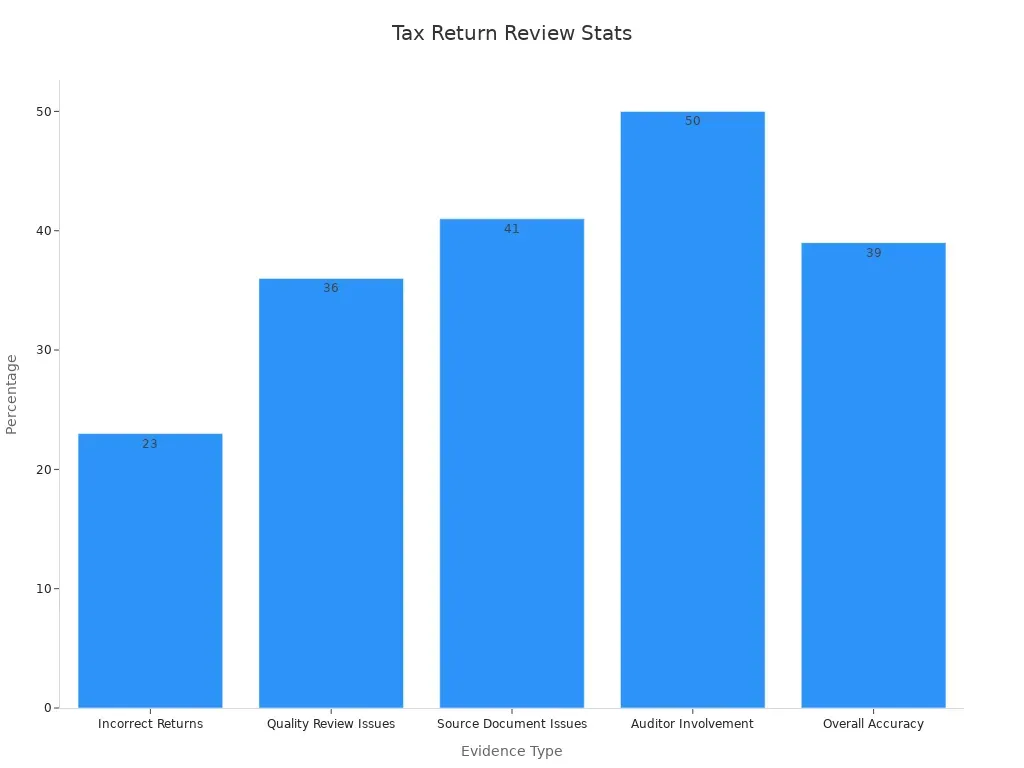
Thoroughly reviewing your tax return can save you from headaches later. A study found that 23% of tax returns not reviewed for quality had errors. Additionally, 41% of reviewers failed to refer to source documents, leading to inaccuracies.
Taking the time to review ensures your return is accurate and reduces the risk of penalties. Once submitted, you can track your refund or payment status through your online account.
Manage Payments or Refunds Online
Managing payments or refunds online is simple and secure. Whether you owe taxes or expect a tax refund, online tools make the process faster and more convenient. Let’s explore how you can handle payments, track refunds, and resolve any issues that might come up.
Paying Taxes Owed Securely Online
Paying taxes online is not only convenient but also highly secure. The IRS and tax filing services use advanced security measures to protect your information. Here’s what makes online payments safe:
To pay taxes, log in to your online tax account and follow the prompts to make a payment. You can use a bank transfer, debit card, or credit card. Paying online ensures your payment is processed quickly and securely, avoiding delays or penalties.
Tracking Refunds with Direct Deposit
If you’re expecting a tax refund, direct deposit is the fastest way to receive it. The IRS sends your refund directly to your bank account, eliminating the wait for a check in the mail. This method also reduces errors and ensures your money reaches you safely.
To set up direct deposit, provide your bank account details when filing your taxes. Most free tax filing services include this option. Once your refund is processed, you’ll receive it in your account within a few days.
Resolving Issues During the Process
Sometimes, issues can arise during online tax filing or while managing payments and refunds. Common problems include errors in your return, delays in processing, or trouble accessing your account. Here’s how you can address these challenges:
-
Check for Errors: Review your tax return for mistakes. Fixing errors early can prevent delays.
-
Contact the IRS: If you’re facing delays or need help, reach out to the IRS. They offer support through phone, email, and online chat.
-
Use Tax Filing Services: Many free tax filing services provide customer support to help resolve issues.
The Taxpayer Advocate report highlights that barriers in e-filing and the lack of user-friendly tax software options lead many taxpayers to file paper returns. Simplifying the e-filing process and ensuring compatibility with all forms can improve your experience. If you encounter issues, don’t hesitate to seek help. The IRS and tax filing services are there to assist you.
Filing your federal tax return online in 2025 doesn’t have to be stressful. Start early and keep your tax filing information organized. Tools like NOTICENINJA can simplify the process by reducing manual errors and helping you stay on top of deadlines. Many taxpayers find online platforms straightforward, with some completing their returns in just 30 minutes. By following this tax filing guide, you’ll save time, avoid mistakes, and even make the process enjoyable. Embrace the convenience of online filing—it’s a game-changer for a smooth tax season.
FAQ
What if I make a mistake on my tax return?
Mistakes happen! You can file an amended return using Form 1040-X. Most online tax software guides you through the process. Fixing errors quickly avoids penalties and ensures your refund or payment is accurate.
Can I file taxes online if I don’t have a computer?
Absolutely! Use your smartphone or tablet. Many tax software platforms have mobile apps that let you file on the go. Just ensure your device is secure before entering sensitive information.
How long does it take to get my refund?
If you e-file and choose direct deposit, most refunds arrive within 21 days. You can track your refund status using the IRS’s “Where’s My Refund?” tool online.
Is online tax filing safe?
Yes, it’s secure! Platforms use encryption and multi-factor authentication to protect your data. Always use trusted software and avoid filing on public Wi-Fi for added safety.
Can I file taxes online for free?
Yes! If your income is below $73,000, you qualify for IRS Free File. Many tax software providers also offer free versions for simple returns. Check eligibility before starting.
Related content